4 Keyword Match Types in Google Ads [2026 Edition]


The way customers shop has evolved! From local stores to tapping the buy now button on ecommerce apps. While online shopping offers convenience, it also comes with hesitation. One major reason is uncertainty: Will this really suit me? Will the color match my skin? Will the fit look the same for me?
Ecommerce stores experience an annual loss of $18 billion in sales revenue due to cart abandonment. They can have many reasons, but one of them is the shopper’s hesitation to buy online apparel. That’s why Google introduced a virtual try-on feature for online shoppers.
Shoppers avoid online fashion products because they cannot visualize how the clothes fit them. This hesitation directly impacts ecommerce conversions and return rates.
To avoid this problem, Google introduced a virtual try-on feature for online shoppers in India. This helps shoppers virtually preview how an apparel looks for their body type, tone, and size. When they try products virtually, they engage more, return less, and build stronger trust with the brand.
Google has officially announced that its AI-powered virtual try-on shopping feature, first announced back in May and gradually rolled out to selected countries in July, has now finally expanded to India this December. It works across Google Search, Google Shopping, and even products appear in Google Images.
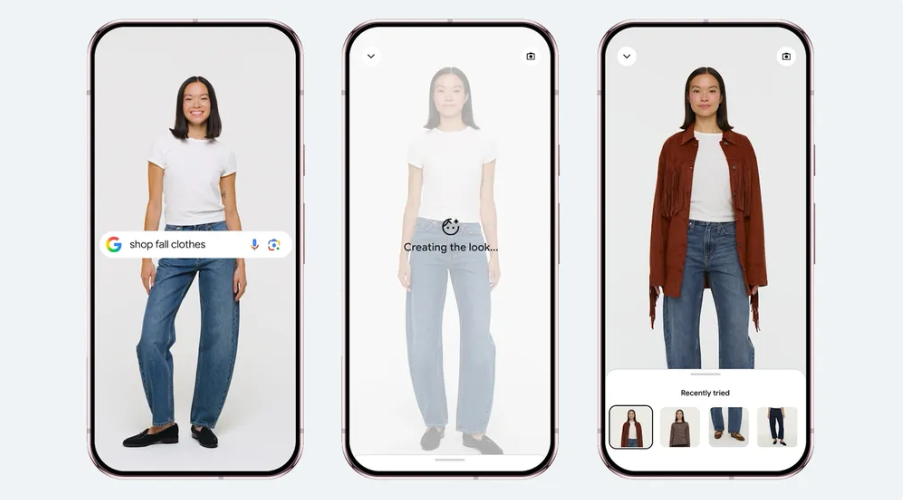
Image credits: Google blog
This feature lets shoppers try on billions of apparel items that are listed on its Shopping Graph. You just need to upload a full-length photo to see how a clothing item looks on your body type.
Here is how to use Google’s AI-powered virtual try-on feature to check out which product perfectly fits you. Follow these three simple steps to virtually try-on the products you like.
Start by searching for what you want on Google Shopping. Whether you are exploring shirts, dresses, or pants, simply tap the “try it on” icon available on product listings.
Next, upload your full-length photo. Use a full-body shot image with good lighting and fitted clothing. Within a few moments, Google’s AI will overlay the garment on your photo, which gives a realistic look before you add it to the cart.
Once you like what you see, you can compare styles, save favorite looks, revisit past try-ons, and share them with friends for a quick style check.
Google’s virtual try-on feature marks a major shift in online apparel shopping. This removes a huge barrier that stops shoppers from completing orders. Moreover, you have more benefits from this feature.
Here’s why you need to pay attention:
Google’s virtual try-on changes the way people shop for clothes online, so ecommerce advertisers need to make a few smart updates to stay visible.
Google’s AI-powered virtual try-on is a major shift in how shoppers discover and purchase clothing online. With this, shoppers can see a realistic fit and style before making a purchase. But an ecommerce business needs to adopt high-quality images, stronger product data, and competitive pricing that can convert prospects into customers.
Want to appear your ecommerce products on Google and AI search? Contact NB Marketing Solutions now to create an interactive and personal experience with shoppers.
For more insights and future updates on digital marketing, stay connected with NB Marketing Solutions.